Simple Schedules
Scheduling automates the show: Playlists of Songs/Sequences are set to play at specified date and time windows.
When a schedule runs, the player plays through:
- The intro playlist (if any)
- The main playlist (optionally applying loop or shuffle to fill the full time slot), and
- The outro playlist (if any)
The schedule then stops.
Creating and editing entries
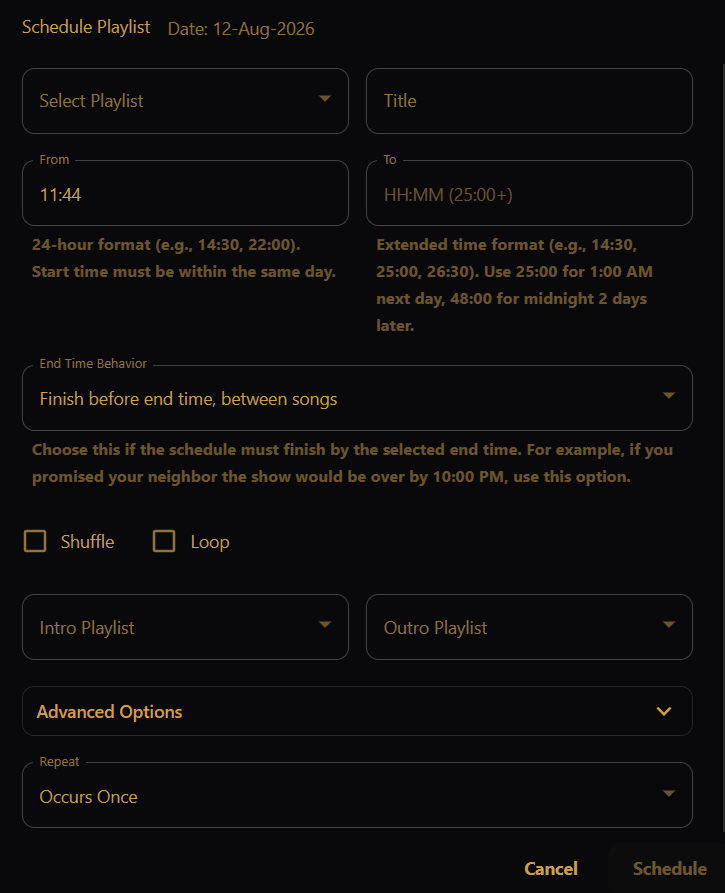
Click a day on the calendar (or an existing block) to open the editor. Fill in:
- Select Playlist — the main playlist for this window. Duration is shown next to each playlist.
- Title — label shown on the calendar. Defaults to the playlist name when you pick a playlist; you can rename it.
- From / To — the time window in 24-hour
HH:MMformat.- From must be within the same day (00:00–23:59).
- To supports extended times so a window can cross midnight — for example
25:00is 1:00 AM the next day,48:00is midnight two days later (up to 168 hours).
- Optionally attach:
- Intro playlist — plays once at the start of the window.
- Outro playlist — plays once as the window winds down.
If the window is longer than the main playlist, Loop may turn on automatically so the slot stays filled. You can switch to Shuffle instead, or turn both off (the player will warn if the playlist is too short to fill the window).
Repeat lets one entry recur:

- Occurs Once — a single date.
- Occurs Daily — every day until an end date.
- Occurs for Selected Days — specific weekdays (for example, Fri–Sun only).

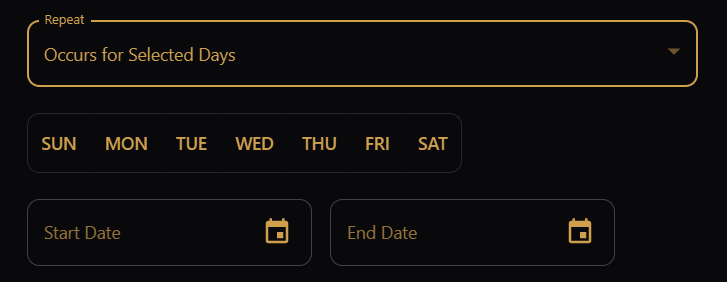
When you edit or delete a recurring entry, choose This Event (only that occurrence) or All Events (the whole series).
Use the FG / BG (Main / Background) toggle at the top to switch which kind of schedule you are editing (see Background Schedule).

Calendar views
Use the view toggle above the calendar to switch between:
- Month — full-month grid. Days from the previous or next month may appear at the edges of the grid (shown with a muted background).
- Week — seven-day timeline with hourly slots.
- Day — a single-day hourly timeline.
Month and Week views support drag-and-drop (see below). Day view does not.
Moving schedules by drag-and-drop
In the Month and Week views, you can drag a schedule block to another day. After you drop it, a dialog asks what you want to do: move, copy, or repeat the schedule.
One-time schedules (Occurs Once)
When you drag a schedule that does not repeat, the dialog offers:
| Action | What it does |
|---|---|
| Move | Move this entry to the dropped date. The time window and all other settings stay the same. |
| Copy | Leave the original entry in place and create a copy on the dropped date. |
| Repeat | Turn this entry into a daily repeating series from one date through the other. |
| Cancel | Close the dialog and leave the schedule unchanged. |
Repeating schedules (Occurs Daily or Occurs for Selected Days)
For repeating schedules, only the start and end date can be dragged, altering the schedule start / end date.
Going further
For background layers, runtime behavior (end policies, priority, loop, shuffle), and previewing a schedule before you go live, see Complex Schedules.