Schedule Options
A simple schedule just needs a playlist and a time window. When you open a schedule entry, a few extra options let you control exactly how it behaves. As there are many settings, it is recommended to use the Schedule Preview feature to make sure they will behave as expected.
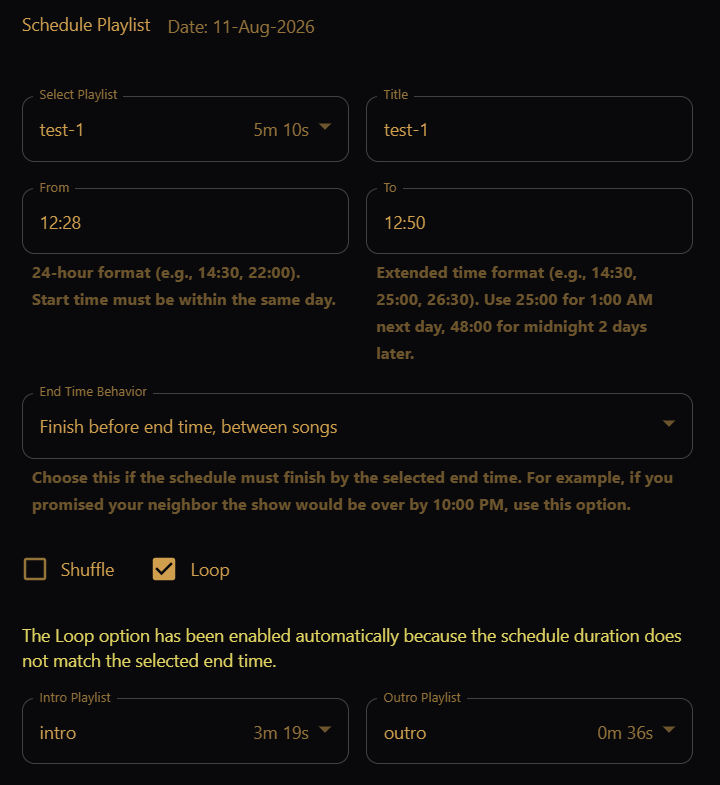
The schedule plays:
- The intro playlist (if any)
- The main playlist, applying loop / shuffle to fill time, if so requested
- The outro playlist (if any)
Filling the time window
- Loop — replay the main playlist until the window's end time.
- Shuffle — play the main playlist in a random order.
You can pick one of these, not both — turning on one turns off the other.
If you set a To time longer than the main playlist (plus intro/outro), Loop is enabled automatically so the window stays filled. A short warning appears when that happens. If you clear both Loop and Shuffle while the playlist is still too short, the editor warns that the playlist will not fill the whole schedule.
End Time Behavior
When doing a loop/shuffle, or if the time slot is too short to accommodate the full intro, main, and outro playlists, the main playlist is adjusted to fit the scheduled time window. However, a window rarely lines up perfectly with the end of a song.
While playing the main playlist, at the end of each song the player evaluates whether there is enough time for another song, taking into account any outro playlist.
End Time Behavior decides what happens when there is not time for exactly one more song:
| Option | What it does |
|---|---|
| Finish before end time, between songs | Do not take another song; always stop on or before the end time. Use when the show must be over by a promised time. |
| Finish after end time, between songs | Take another song; always stop on or after the end time. Use when the show should still be playing at a promised time. |
| Finish near end time, between songs | Play another song if at least half of it fits; the schedule may end roughly half a song before or after the end time. |
| Finish exactly at end time, even if a song gets cut off | Stop exactly at the end time, even mid-song (abruptly). |
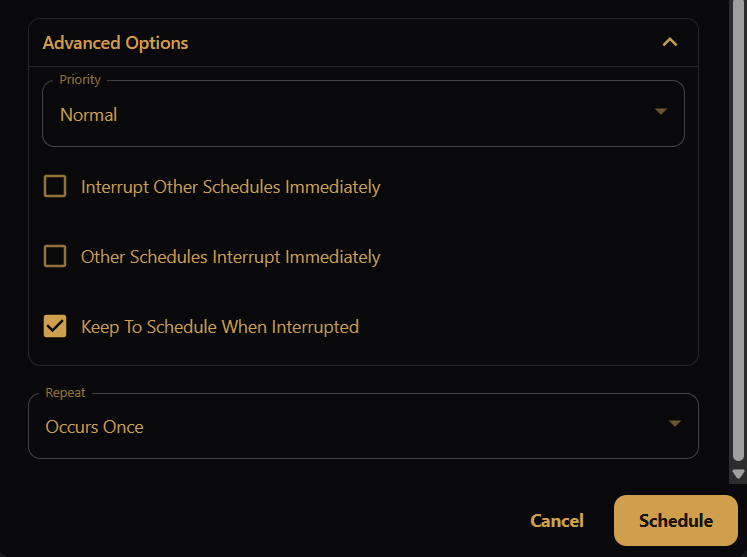
Advanced Options
Priority and interrupt settings live under the collapsible Advanced Options section in the schedule editor.
Priority and overlaps
When two schedules overlap in time, Priority (Low, Normal, High) decides which one plays. If a higher-priority window takes over, the lower-priority one pauses and resumes afterward.
Two checkboxes fine-tune whether one schedule interrupts the other between songs, or immediately:
- Interrupt Other Schedules Immediately — high-priority schedule cuts in right away instead of waiting for the current song to finish.
- Other Schedules Interrupt Immediately — causes a higher-priority entry to cut into this one right away. (Useful for animation schedules, rather than songs.)
A further checkbox controls whether the interrupted sequence keeps "playing", or pauses while interrupted:
- Keep To Schedule When Interrupted — after being interrupted, pick back up where the clock is now rather than where it left off.